
How To: Buy more than two of item A and get a discount limited to one of that item and get a discount off item B
 | Telesales Rules is an Advanced User feature. |
If a customer buys more than 2 of item A, they can receive a discount limited to one of item A and get a further discount limited to one of item B.
Notes:
- The % discount is the same for both items A and B.
- The limit on the number of items applies to both stock items.
Example Scenario
In the example below:
if the customer:
- buys more than two Light Golden Fake Tans (BFTLG);
they can have:
- a free Light Golden Fake Tan (BFTLG); and
- a free Hand Wash (BHW).
Action Details and Group Comparison Scope
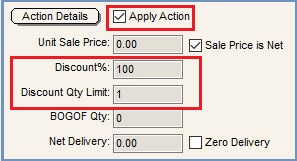
Make the rule active, set the 100% discount rate and set the Discount Quantity Limit
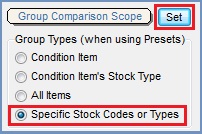
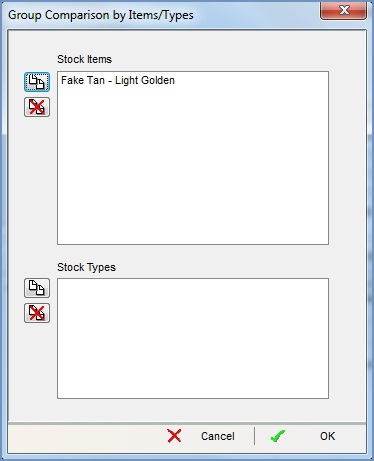
Define the Stock Item the Customer has to Purchase to Qualify for the Offer
Condition Detail
See How To: Create a new Condition Tree in a New Telesale Rule and How To: Add an Additional Telesale Rule Condition Tree for creating the conditions when setting up the Telesales Rules.
If ALL the following conditions are TRUE
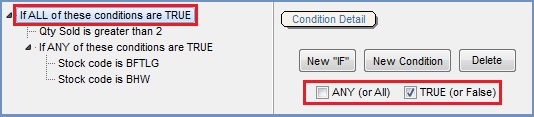
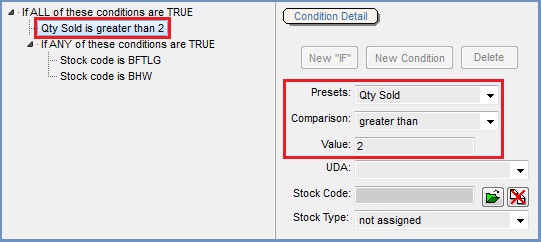
Set the Quantity Sold for Item A
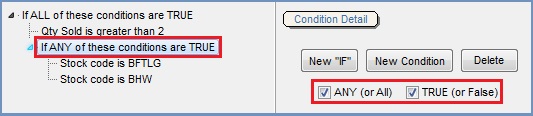
AND If ANY the following conditions are TRUE
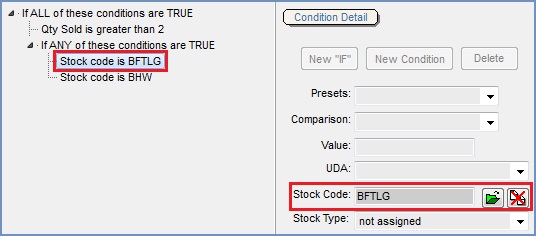
Set the Stock Item A
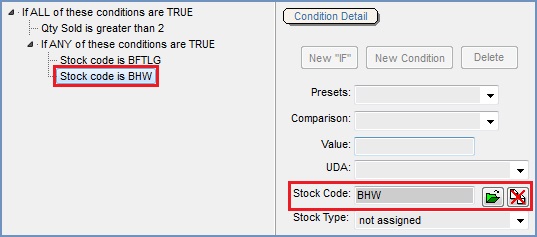
Set the Stock Item B
Result

- Three of item A bought but only one has a discount.
- Two of item B bought and the discount only applies to one item.
- Other items not included in the offer.