Type the Telesale Rule title in the Short Description field.
Click on the button.
Click Yes in the Confirm popup to create a new Condition Tree.
Press Ctrl+S or click to save.
Press Alt+E or click to enter edit mode.
Focus on the If condition and select whether:
Any (or All) (default) of the defined conditions are to be assessed and/or;
If the conditions are to be True or False (default):
Focus on in the tree to the right of the screen and set the options required in the Condition Detail area displayed on the right:
To add additional conditions to the Condition Tree use the button or to add a new Condition Tree use the button.
Notes:
When adding new conditions or new condition trees you need to save the Telesale Rule first.
Remember to focus on the previous condition in the condition tree that you wish to add the new condition or If condition tree to before clicking the relevant button.
Press Ctrl+S or click to save once you have finished creating your Telesale Rule.


 .
. button.
 to save.
 to enter edit mode.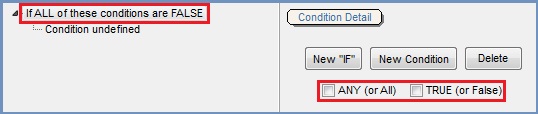
 in the tree to the right of the screen and set the options required in the Condition Detail area displayed on the right: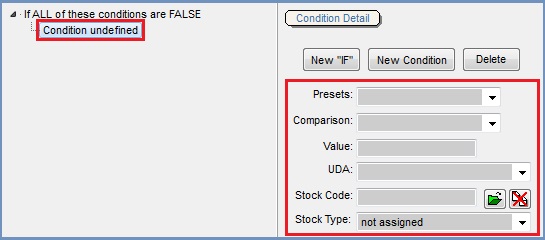
 button or to add a new Condition Tree use the