
New Task Dialog
The New Task dialog is available from the context menu (Schedule Task) in the upper grid in the [CRM Manager | Comm Log (Leads)] screen. It allows the user to enter a task against a customer or supplier that will appear in the following screens:
- The customer or supplier
[ Customer | Detail | CRM | Tasks ]tab. [ CRM Manager | Tasks ]tab.[ CRM Manager | Appointments and Actions (List) ]tab if the Create associated reminder action has been ticked when creating the task.[ CRM Manager | Appointments and Actions (Diary) ]tab if the Create associated reminder action has been ticked when creating the task.
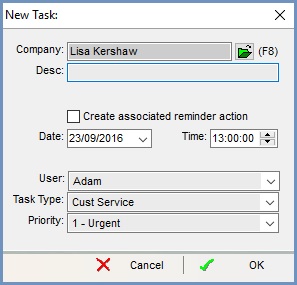
The popup consists of:
- Company: the company, customer or supplier the task is for; this can be changed by clicking the
 button or pressing F8.
 - Desc: description of the task.
- Create associated reminder action: if
 ticked then a reminder will be created in the
 [ CRM Manager | Appointments and Actions (List) ]and[ CRM Manager | Appointments and Actions (Diary) ]tabs. - Date: the date the task is for.
- Time: the specific time for the task.
- User: the user who is to carry out the task.
- Task Type: the type of task for example sales or customer service as set up in
[ System Data | Contact Manager | Task Types ]. - Priority: the type of priority for example Urgent, non-urgent as set up in
[ System Data | Contact Manager | Task Priorities ].